17/9/2026
-
6
min
Most conversations about Agentic AI in industry start three levels too high: autonomous factories, agents talking to other agents. This is the small version that actually works, five building blocks that let an operator ask the plant a question and get a real answer.
Most conversations about Agentic AI in industry start three levels too high: autonomous factories, agents talking to other agents. This is the small version that actually works, five building blocks that let an operator ask the plant a question and get a real answer.


In our last article, we spent well over a thousand words defending the good old AI model. The one that delivers real value while everyone else talks about agents.
And I stand by every word of it: Agentic AI is absolutely overhyped.
But "overhyped" is not the same as "useless." The problem is that almost every conversation about Agentic AI in industry starts three levels too high: autonomous factories, self-optimizing plants, agents talking to other agents...
Meanwhile, the question we should probably be asking is much smaller:
"Can I ask my plant a question and get a real answer?"
That's it.
No autonomous factory. No agents talking to other agents and conspiring to wipe out humanity. Just a natural-language interface connected to your own industrial data, capable of answering a simple question like: "What happened on Line 3 last night?"
And here's the interesting part: you can get something like this running in an afternoon. Not production-ready, but working. Working well enough to understand what Agentic AI actually is, what each piece of the stack does, and whether any of this could be useful to you.
So let's build it.
Before we deploy anything, let's agree on what we're actually building. Because "agent" is one of those words that means different things to different people.
For this article, we'll keep the definition deliberately practical: an agent is a system that can understand a goal, decide which tools it needs, use them, inspect the results, and repeat that process until it can produce an answer.
Ours will be a very simple agent. It won't control the plant. It will help us understand what is happening inside it.
To make that possible, we need five building blocks:
I'll use one specific stack as the reference implementation, but I'll mention alternatives for each layer as we go. What matters here is not the logos, but the shape of the architecture.
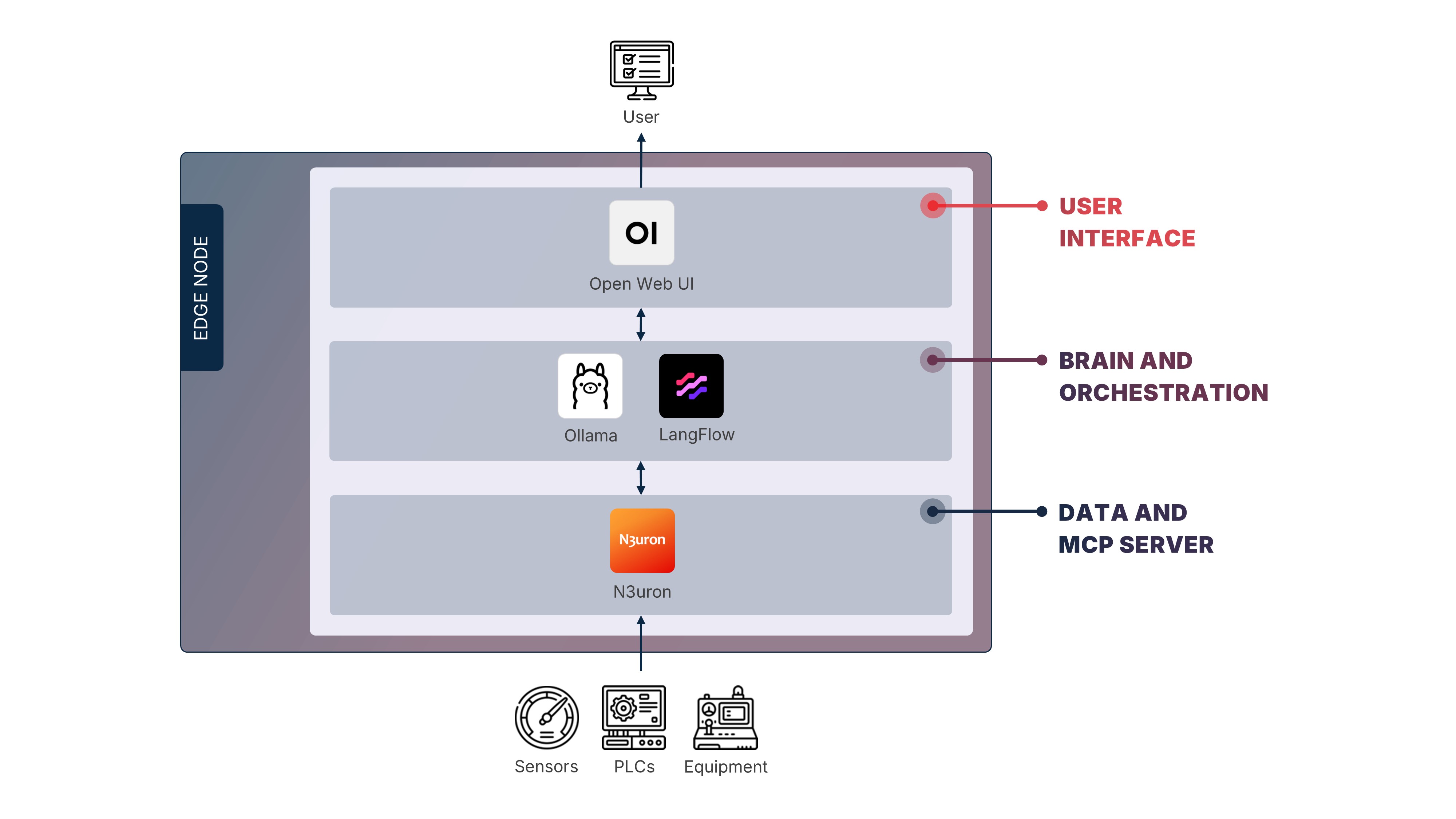
I know. You wanted to start with the model.
Here's the uncomfortable truth about Agentic AI in industry, and yes, you guessed it:
"The agent is only as good as the data underneath it."
So the first layer is the boring one: industrial connectivity.
You need something at the edge that talks to PLCs, sensors, and machines, normalizes the data and adds some context. In a real architecture, connectivity, contextualization and storage may be separate systems. For this pilot, we'll treat them as one logical layer.
Just don't try to connect too many assets. For a first pilot, pick a handful of machines that already speak the same protocol, OPC UA for example, and start there. The goal at this stage is not to build the perfect infrastructure. The goal is to build something.
In our example, that role is played by N3uron, which combines industrial connectivity, contextualization, and local data handling in one place. Other great options include Ignition, Kepware, HighByte, or Litmus.
Again, the product matters less than the role it plays in the architecture.
Now we get to the good part.
We have the data. But the model still needs a way to ask for it. And we're not looking for a traditional database connection. We are looking for an interface that says: Here are the things you're allowed to ask for and here's what each one does.
Fortunately, there's a way of doing this: MCP, the Model Context Protocol.
The easiest way to think about MCP is as a restaurant menu.
The model is the customer. It doesn't walk into the kitchen, open random drawers, and start improvising with whatever it finds. It gets a menu: a list of things it can ask for, with a description of what each one does. And it's the MCP server that decides what goes on it, which tags, historical queries, or calculations the agent can access. As far as the agent is concerned, everything else stays out of reach. If it's not on the menu, the model can't order it.
In our example, N3uron's MCP Server takes this role, but we could have also used HighByte or Litmus, for example.
For this first pilot I strongly recommend keeping it read-only. No setpoints. No commands. The model just reads, reasons, and reports.
Humans act.
Now we can finally talk about the model.
We're going to run it locally, which means no calls to an external API and no plant data leaving the site.
For our stack, we'll use Ollama, but you can also use LM Studio, LocalAI, or llama.cpp if you want more control over the inference layer.
That's the easy part. The harder question is: what model can your hardware actually run?
A small model in the 7B–8B range can run on relatively modest edge hardware, especially when quantized. However, if you move into the 12B–14B range, memory requirements start growing very quickly.
Which immediately leads to the obvious question:
"Is an 8B model actually good enough?"
Short answer: Probably not.
We've become accustomed to talking to enormous models running on enormous amounts of compute. I mean, ENORMOUS amounts. Put a small local model beside ChatGPT or Claude and the difference can be painfully obvious.
But that comparison is unfair. We are not asking this model to write a novel or explain quantum mechanics. Its job is mostly to understand the question, select the right tool and turn the returned data into a useful answer. And for that job, a good small model can be enough.
So choose a model from the Qwen, Llama, or Gemma families and treat it with love.
We have the data, exposed through an MCP server, and we have the model.
Now something has to sit in the middle and run the show. That means taking the user's question, sending it to the model together with the available tools, executing the tool calls it requests, feeding the results back, and repeating the loop until there is a final answer.
Let's call this the "orchestration" layer.
In our example, we'll use Langflow, a visual builder where you connect all the pieces (the model, MCP tools, prompts) on a canvas. Alternatives include Flowise and n8n.
The real work here is not the model, but the instructions and tools around it. Good tool descriptions, clear asset context and explicit rules for handling uncertainty are key. This is where you train the agent, and not in the machine-learning sense: you never touch a weight. You define its role, its boundaries, its tools and its rules.
You can think of it as a junior operator who needs a thorough onboarding.
We are almost there, but a human still needs to talk to this thing, right?
So let's give it a face.
For our stack, we'll use Open WebUI, a chat interface that gives operators a simple way to ask questions. Alternatives include LibreChat and LobeChat.
Deploy it, point it at Langflow, and you're done.
The user sees a chat box. Behind it, Langflow talks to the model, the model calls the right tools, the MCP server retrieves the industrial data, and the answer comes back to the screen.
However, before giving it to operators, run some tests yourself. Just create a small set of questions for which you already know the answers, things like downtime, anomalies, and known incidents. Then ask about them to check whether the agent selects the right tools, retrieves the right data and clearly says when it doesn't know.
Once you're happy with the basics, give it to an operator.
They type:
"What happened on Line 3 last night?"
And the plant answers.
Gartner expects a significant share of today's Agentic AI projects to be scaled back or abandoned. But I don't read that as evidence that Agentic AI doesn't work. I read it as evidence that we keep starting with ambitions that are far too big.
"What if we did the opposite?"
Connect one production line properly. Expose twenty useful tags. Run a small model locally. Put a chat interface in front of it. Then give it to a few engineers for two weeks.
At the end of that experiment, you'll know something no analyst report or slide deck can tell you: whether Agentic AI is actually useful in your plant, for your people, with your data.
And if it isn't?
Fine. You spent a few days learning something valuable instead of three years building an AI strategy around a PowerPoint.
Start small.
Keep it read-only.
And let the plant answer for itself.
Barbara enables industrial organizations to deploy, orchestrate, and continuously manage distributed applications and AI models directly at the edge — where latency, bandwidth constraints, and data sovereignty cannot be compromised.
Built for complex environments with SCADA systems, PLCs, legacy protocols, and heterogeneous hardware, Barbara helps IT and OT teams move beyond pilots and scale secure edge deployments to thousands of nodes.
If you're working on similar challenges or exploring how edge platforms can support your industrial initiatives, explore more insights on our blog or get in touch with our team to continue the conversation.
Alternatively, you can also start using the platform today.

Line 3 goes down in the middle of the night shift. Who's going to fix it? If the answer is "we'll open a ticket", you may have chosen the wrong tool. In this article, we explore why Kubernetes, the default choice for container orchestration, can be overkill on the plant floor.

Most conversations about Agentic AI in industry start three levels too high: autonomous factories, agents talking to other agents. This is the small version that actually works, five building blocks that let an operator ask the plant a question and get a real answer.
.jpg)
Everyone is chasing generative AI and autonomous agents, but the industrial AI that already delivers, predictive maintenance and computer vision, never left the factory floor. A field reality check on hype versus what actually works, and why the best engineering starts with the problem, not the technology.


